
OurDream AI is an AI companion platform that combines roleplay chat with in-chat image generation and short video clips for custom or premade characters.
OurDream AI is one of those platforms that tries to do a bit of everything in the AI companion space. You get chat with premade or custom characters, image generation that actually matches what you’re talking about, and the option to spin short videos once you’re deeper into a conversation. The free trial gives you enough room to see how the bots respond and whether the visuals hold up before anything asks for money. It’s not the most stripped-back option out there, but it also doesn’t force you through a ton of setup just to test the basics.
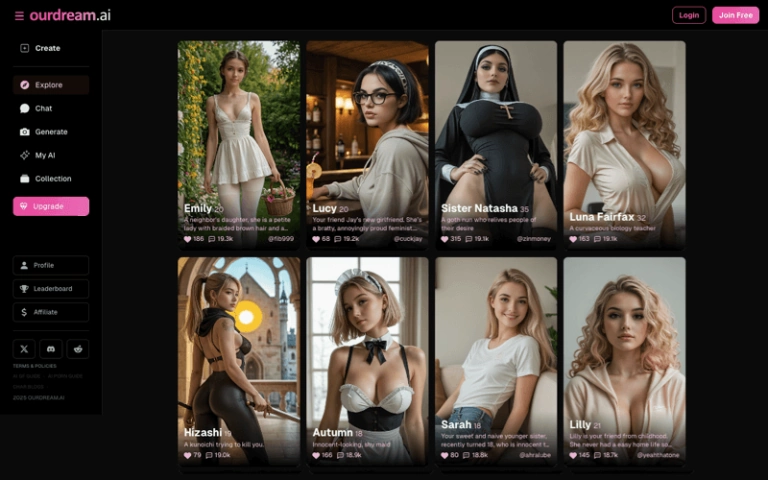
The site sits between the pure chat-focused tools and the heavier image generators. Most of the premade characters lean realistic, with a smaller set of anime options mixed in. Thumbnails look clean for the most part—no obvious extra fingers or warped faces on the front page, which is more than you can say for a lot of the stuff that was floating around a year ago. Some of the previews even have short animated loops, so you get a rough idea of movement before you click in.
What You Can Actually Do
The main draw is the combination of roleplay chat and visuals tied to the same character. You pick someone from the library or build your own, then talk. Responses tend to run a few lines of dialogue mixed with italicized actions or scene descriptions. It’s not pure one-line dirty talk, and it’s not a novel either. Most of the time it stays in that middle ground where the bot stays in character while still pushing the conversation forward.
Once the chat is going, you can generate images inside the thread based on what’s happening. It costs credits, and the results usually try to match the current description instead of just dumping a random nude. There’s also a standalone image tool if you want to work outside the chat. Short video clips are available too, though they burn through credits faster and the quality is more hit-or-miss. Faces and body proportions hold up better on stills than they do once things start moving.
Voice is present on paid plans. It’s not the strongest part of the package—still has that slightly synthetic edge a lot of these tools have—but it’s usable if you want the character to read messages out loud instead of just seeing the text. Lust level and response length can be adjusted on some characters, which helps if you want longer or more explicit replies without having to keep prompting for it.
Building or Picking a Character
The premade library covers a decent spread. You’ve got the usual mix of roommate, goth, student, and more exaggerated fantasy types, plus a few that lean into specific scenarios like a shy chemist or a dominant boss. Descriptions are short but clear enough that you know what you’re walking into. Most people will start here because it’s the fastest way to test the chat quality.
If you want something more specific, the character builder is where the site puts more of its effort. You choose realistic or anime, then work through ethnicity, age range, hair, eyes, body type, and breast/butt size. After the visual options, there are text boxes for personality, clothing, scenario, greeting, and extra details. It’s more flexible than the pure dropdown builders on some rivals, but it also means you have to write a bit if you want the bot to actually stick to a specific personality instead of defaulting to generic flirting.
The builder is locked behind a paid plan, which is common. Free users can chat with existing characters and generate a limited number of images before the trial runs out. Once you’re on a subscription you can save your own characters and come back to them.
How the Chat and Visuals Hold Up
In practice the roleplay is one of the stronger parts. Bots will usually stay inside the scenario you set or the premade description, and they’ll expand on what you say instead of just repeating the same few lines. Explicit content is available without heavy filtering once you’re past the free tier, though some characters will escalate faster than others. If you want a slower build, you sometimes have to steer the conversation back yourself.
Image quality is generally good for the category. Prompt adherence is better than it used to be on a lot of these tools—if you describe an outfit, setting, or pose, it usually shows up. Hands and fine details still slip occasionally, and complex scenes can lose consistency, but the hit rate is high enough that most generations are usable. Video is shorter and more variable. Some clips look decent for a few seconds; others get the usual morphing or stiffness that current AI video still has. It’s a feature that exists, not the main reason to stay.
Memory is limited to the recent conversation history. It works fine within a single long session, but details from earlier days can drop off. That’s a common limitation across most of these platforms right now, and it shows up here too if you try to run a multi-day storyline.
- Flexible character builder for personality and scenarios
- In-chat images usually match the conversation
- Usable free trial for chat and basic visuals
- Media generation costs extra coins on top of the plan
- Memory limited to recent conversation history
Pricing and What the Numbers Actually Mean
The free trial is usable for testing chat and a handful of images. After that, the main paid option is the Premium plan at roughly $20 a month, or closer to $10 a month if you pay annually. That comes with a set number of DreamCoins (around 1,000 per billing cycle) that you spend on images, video, and voice. Text chat itself is unlimited once you’re subscribed.
Higher tiers exist if you want more coins and higher limits on simultaneous generations or quality settings. Extra coin packs are available if you burn through the monthly allowance. The exact cost per image or video isn’t always spelled out in one clear place, so you’ll have to test a few generations to see how fast the balance drops. Images are the cheaper option; video and longer voice clips add up quicker.
Annual billing is cheaper on paper, but it’s worth checking the cancellation terms before committing. The coin system means the headline price isn’t the full story if you’re generating a lot of visuals every session.
Who This Makes Sense For
OurDream AI works best if you want one place that handles both the conversation and the visuals without jumping between apps. The character tools are flexible enough for people who like setting up specific scenarios, and the premade options are solid if you just want to jump in and test the chat. It’s less ideal if your main priority is long-term memory across weeks of conversation, or if you want the absolute highest video quality—those areas are still developing across the whole category.
The free trial is the practical starting point. Chat with a couple of the premade characters, generate a few images inside the thread, and see whether the style of replies and the visual results match what you’re looking for. If the combination of roleplay and matching pictures is the main thing you care about, the paid plan covers that without forcing you into a separate image generator. Just keep an eye on the coin balance if you plan to generate frequently, because that’s where the real usage cost shows up.
Overall it’s a functional middle option in a crowded space. It doesn’t lead on any single feature, but it puts chat, images, and short video under one account with a character system that actually lets you influence the personality. For people who want that mix without managing multiple subscriptions, it’s worth testing before committing.